
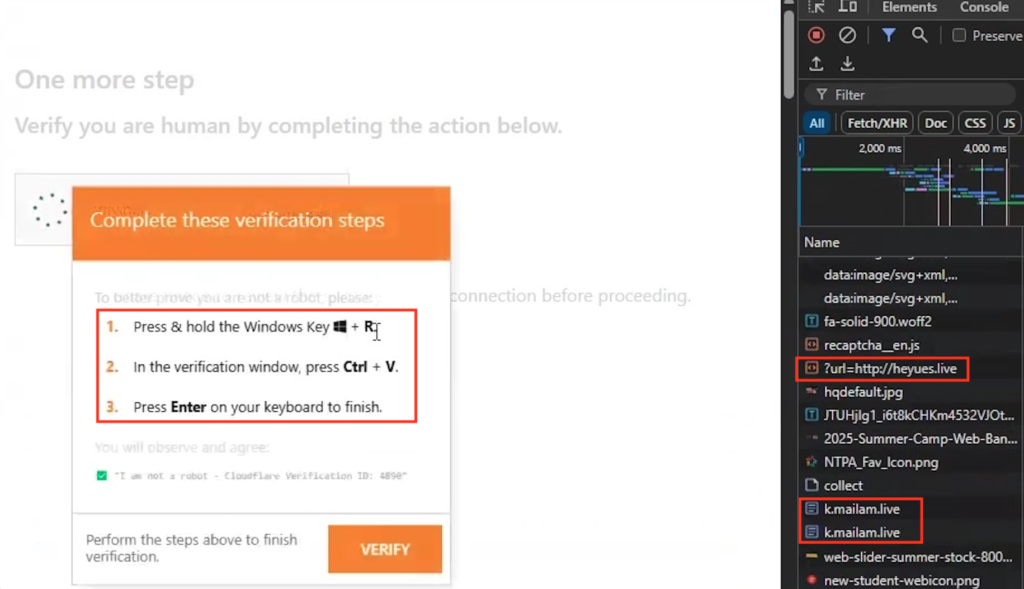
Every person online clicks CAPTCHA boxes to prove they are human. Threat actors noticed this automatic habit and created a highly dangerous social engineering attack called ClickFix. The “verify if you’re a human” virus hides inside fake security prompts on compromised websites. Instead of asking you to click pictures of bicycles or traffic lights, the fake prompt instructs you to copy a code and paste it into a system terminal.
This attack skips standard software downloads. It relies entirely on tricking the user into executing a malicious script themselves. By typing or pasting the command, the victim hands total control of their computer directly to the attacker. Recognizing the exact steps of this scam provides the technical facts needed to stop the attack before it starts. Organizations track these social engineering methods closely, and consulting the Cybersecurity and Infrastructure Security Agency (CISA) gives defenders the most accurate threat intelligence available.
The Mechanics of a Fake CAPTCHA Attack
A standard ClickFix attack begins when a user visits a compromised website or clicks a malicious advertisement. The page displays a highly realistic popup resembling a Cloudflare or Google reCAPTCHA verification. The text tells the user they must prove they are human to view the website or fix a sudden browser error.
The prompt instructs the user to press a keyboard shortcut, such as the Windows Key + R, to open the Run dialog box. Next, it tells the user to open Command Prompt or Windows PowerShell. Finally, the prompt asks the victim to paste a short string of text and press Enter. The website secretly placed a malicious script onto the user’s computer clipboard the moment they clicked the fake CAPTCHA box.
| Attack Step | User Action | Hidden Malicious Result |
| The Lure | Victim visits a compromised website | Site displays a fake Cloudflare or Google CAPTCHA |
| The Setup | Victim clicks “Verify you are human” | Site silently copies a PowerShell script to the clipboard |
| The Trap | Victim opens PowerShell or Run dialog | User exposes the system command line interface |
| The Execution | Victim pastes the text and hits Enter | User manually runs the virus payload |
The Malware Dropped by the ClickFix Prompt
The moment the user presses Enter, the pasted PowerShell script executes in the background. The first thing the script does is clear the system clipboard, removing the code so the victim cannot see what they just pasted. The script then establishes a silent connection to a remote command server.
The remote server sends secondary malware payloads back to the infected computer. Threat researchers track several dangerous viruses distributed through this exact method, including Lumma Stealer and DarkGate. These information stealers hunt through the local hard drive for saved web browser passwords, active session cookies, and cryptocurrency wallet keys. The malware packages this data and transmits it straight to cybercriminal syndicates for use in future identity theft operations. You can monitor the behavioral patterns of these secondary infections by reviewing our active virus threat library.
Bypassing Security Defenses With Human Action
ClickFix succeeds by weaponizing human trust. Firewalls and antivirus software look for malicious files entering the network. They struggle to block a virus when the authorized user manually opens a terminal and forces the command to run. The malware slips past automated security filters completely.
The technique became so common that security researchers added it to official threat tracking frameworks, categorizing it as user-level malicious execution. Attackers keep changing the templates. They use fake Microsoft Teams updates, fake document viewer errors, and fake QR code generators to deliver the exact same terminal instructions. The goal always remains the same: push the user to run the script.
Defending Against Malicious Scripts
Stopping the “verify if you’re a human” virus requires one strict rule. No legitimate website, security check, or CAPTCHA will ever ask you to open a system tool like PowerShell, Command Prompt, or Mac Terminal. Legitimate human verification happens entirely inside the web browser window.
If a website asks you to copy a command or open a Run dialog box, close the browser tab immediately. Do not call any support numbers listed on the page. Clear your clipboard history to ensure you do not accidentally paste the malicious script into another application. Keep your operating system and web browser fully updated to block the websites hosting these deceptive overlays. A secure computer requires users to pause and question unusual technical instructions before pressing Enter on their keyboard.